Check Oman Visa Status Online Using Passport and Reference Number
How to Check Your Oman Visa Status
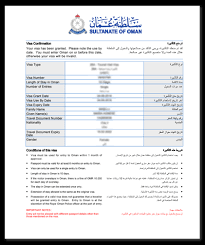
Applicants who have applied for an apply for an Oman Visit Visa can check their application status using the application reference number and passport on the Royal Oman Police website.
Note: Tracking is not possible with only the passport; the reference number is required.
Track Your Oman Visa Application
- Use your reference number sent via email to track your Oman visa status on Musafirevisa.
- Visit the official Royal Oman Police tracking link: https://evisa.rop.gov.om/en/track-your-application
Applying for Oman eVisa
- Apply for 10, 28, or 30 days single entry Oman eVisa at www.musafirevisa.com.
- Fill out the apply for an Oman Visit Visa with basic information.
- Upload required documents and pay the visa fee online.
- Receive your Oman eVisa by email after approval.
Related Articles
- Going to Oman? Know about Top 10 Amazing Things to Do
- Who Needs a Tourist Visit Visa for Saudi Arabia?
- Oman eVisa for UAE Residents | Get Oman Visa from Dubai
- Egypt Visa Online | Apply Egypt eVisa for Tourist Purpose
You May Also Like:
- UAE Visa for GCC Residents
- UAE Visa for Syrian Citizens
- UAE Visa for Saudi Arabia Residents
- UAE Visa for Moroccan Citizens
- UAE Visa for Egyptian Citizens
- UAE Visa for Pakistani Citizens
- UAE Visa for Philippines Citizens
- UAE Visa for Turkey Nationals
- UAE Visa for British Nationals
- UAE Visa from South Africa
- UAE Visa for Canadian Citizens
- UAE Visa for US Citizens
- UAE Visa for Indian Citizens
Related Visa Guides You May Find Useful
- Planning a Trip to Oman Here’s How to Get Your Oman Visa…
- Omani Food Guide: What to Eat
- Oman Visa for Indonesian Citizens
- Oman Visa for Thai Citizens
- 3-Step Guide to Getting Your Oman Tourist eVisa
Frequently Asked Questions — Oman Visa
Can I apply for a Oman Visa online?
Yes. You can complete the entire Oman Tourist Visa application online and receive your approved visa by email — no embassy visit required.
How do I apply for a Oman Visa online?
Open the Oman Visa application page, enter your passport details, upload your passport copy and photo, pay the fee online, and your approved Oman Tourist Visa is emailed to you.
What documents do I need for a Oman Visa?
A valid passport with at least six months' validity, a recent passport-style photograph, a working email address, and a debit or credit card to pay the fee.
How long does the Oman visa take to process?
Most applications are processed within a few business days. A Oman Express Visa option is available if you need your visa faster.
Is the Oman Visa processed entirely online?
Yes. The Oman Tourist Visa is handled online from start to finish, so there is no embassy appointment or document posting for most applicants.
Quick Overview
- Visa type: Oman eVisa (Tourist) (Tourism)
- Length of stay: up to 30 days
- Entry: Single entry
- Processing time: 3–5 business days
- Approval: 100% online — sent to your email
- Apply: at least 2 weeks before travel
- ✅ Apply online in under 10 minutes
- ✅ No embassy or consulate visit
- ✅ Secure online payment
- ✅ 24×7 customer support
What travellers need to apply
Note: Only a passport copy and photograph are required at the time of application:
- Valid passport (6+ months validity)
- Passport-type photograph
- Arrival flight ticket booking confirmation
- Return flight ticket booking confirmation
- Accommodation details